

Debited to P&L A/C Credited to P&L A/C Debited to Capital A/C None


Sundry debtor refers to either a person or an entity that owes money to the business. If someone buys some goods/services from the business and the payment is yet to be received, a group of such individuals or entities is called sundry debtors. Sundry debtors are also referred to as trade receivableRead more
Sundry debtor refers to either a person or an entity that owes money to the business. If someone buys some goods/services from the business and the payment is yet to be received, a group of such individuals or entities is called sundry debtors. Sundry debtors are also referred to as trade receivables or account receivables.
The term ‘Sundry’ means various or several, referring to a collection of miscellaneous items combined under one head. Sundry debtors typically arise from core business activities such as sales of goods or services. The business treats them as an asset.
Example
Suppose you run a business, ABC Ltd. Mr. Y bought goods from you on credit. Therefore, Mr. Y will be recorded as Debtor (current asset) in your books of accounts. Similarly, a collection of such debtors is viewed as sundry debtors from the business’ point of view.
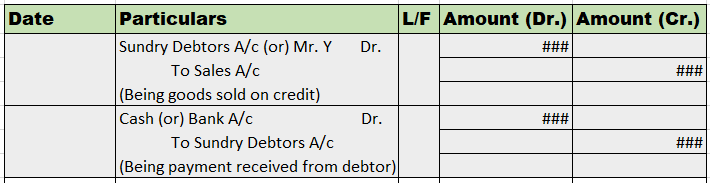
Journal Entry
Rules
As per the golden rules of accounting, we ‘debit the receiver and credit the receiver’. That’s how in this journal entry we’ll be debiting the sundry debtor’s account. Also, ‘debit what comes in and credit what goes out.’ That’s why sales a/c is credited and cash a/c is debited.
As per the modern rules of accounting, ‘debit the increase in asset and credit the decrease in asset’. That’s why we debit sundry debtors and cash a/c. And credit sales a/c when goods are sold and inventory decreases.
Why debtor is an asset?
As we know, a debtor refers to a person or entity who owes money to the business which means, the money is to be received by them in the future, making them an asset. On the other hand, creditors are a liability to the firm as we owe them money and it is to be paid by us in the near future, making it an obligation for the firm.
Sundry Debtors in Balance Sheet
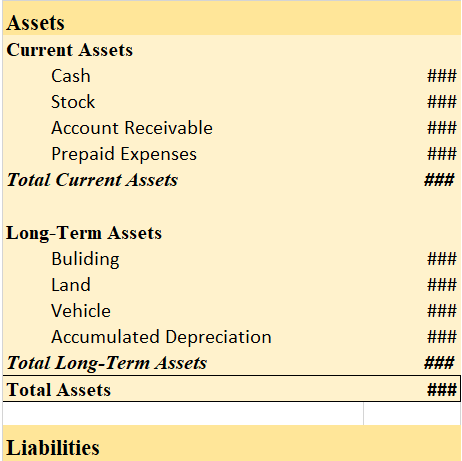
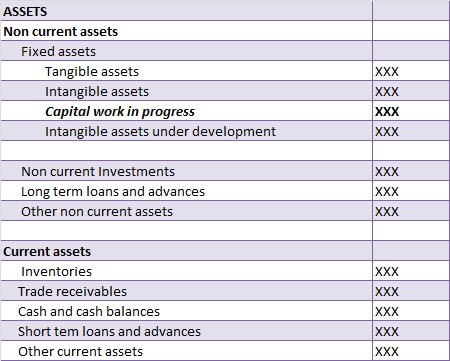
Sundry debtors are shown under the current asset heading on the balance sheet. They are often referred to as account receivables.
Balance Sheet (for the year ending….)









Interest on Drawings Interest on drawings is debited to the capital account. As Interest on drawings is charged on the drawings made by partners/proprietors from their respective capital accounts in a partnership firm or proprietary concern. Drawings refer to the amount withdrawn by an owner or parRead more
Interest on Drawings
Interest on drawings is debited to the capital account.
As Interest on drawings is charged on the drawings made by partners/proprietors from their respective capital accounts in a partnership firm or proprietary concern.
Drawings refer to the amount withdrawn by an owner or partner for his personal use. Thereby, interest on drawings is an income of a firm payable by the owner hence, it’s deducted/debited.
The Profit and Loss Account, on the other hand, shows the income and expenses of a business incurred over an accounting period. Accounts like interest on drawings and capital are not shown in the P&L a/c because they are internal transactions and P&L a/c focuses only on the financial statement that summarizes the revenues, costs, and expenses incurred during a specified period.
Partners’ Capital A/c
See less